hands-on ~
Oak Wine & Steak · Rama 4, BangkokJonny West
Get connected first
Wi-Fi
Network
OakWineSteakRama4
Password
Oakwinerama4
Get on the Wi-Fi now. We start hands-on in a few minutes.
YOUR WORKSHOP SLIDES
Type this into your browser:
aiceos-bkk.pages.devSave the link for the exercises and resources.
Today's Co-Host
Meet KruBow
Founder, Engbrain
She built one of Thailand's leading phonics-focused English teaching brands.
13+ years
teaching phonics
20,000+
students trained
Today, KruBow is co-hosting the workshop with Jonny and helping turn every idea into something practical.
BEFORE WE BEGIN
We're glad you're building with us today.
Thank you for choosing to spend this day learning and building with us.
WE APPRECIATE YOU
Your ticket includes a one-hour VIP group Q&A with Jonny, 3:00 to 4:00 PM.
STAY AFTER THE WORKSHOP
Thank you for joining us again. We love building with you.
GREAT TO HAVE YOU BACK
Today's Schedule
Get on the Wi-Fi. Open Claude.
Hands-on. Build a real website and a simple automation from scratch.
Short break. Quick questions with Jonny.
Your own business problem, with guidance.
We'll introduce it. You decide if it's for you.
Drinks and networking.
With Jonny. VIP ticket holders only. Until 4:00.

AI news · September 22 · Claude Opus 5.5
How smart
Same level
Cost of a typical task
40% cheaper
Anthropic reports these improvements. Opus 5.5 announcement
AI news · last 3 weeks
Oct 7 · Haiku 5.5
75% cheaper to run
Anthropic's fastest model yet, built for high-volume jobs.
Sep 28 · Sonnet 5.5
30%+ faster
And up to 30% cheaper per task than Sonnet 5.
What it means for you: start with one job you repeat every week.
Anthropic announcements: release notes, Haiku 5.5, Sonnet 5.5. Savings vary by task.
AI news · October 8, 2026 · Claude Dashboards (beta)

"Make a dashboard of our ride data" → a live dashboard that stays up to date with your data. Paid plans.
Same day: Claude Docs, Slides & Design are out of beta, on every plan including Free.
Screenshot: Anthropic, Dashboards and Motion announcement.
AI news · October 8, 2026 · Claude Motion (beta)
Real animated video, made by Claude, export as MP4. No AI-generated people. Team and Enterprise plans.
Video: Anthropic, Dashboards and Motion launch film.
Act 1 · The shift
What changes when getting work done becomes cheap?
Before
More work = more people
Now
1 person + AI = entire departments
One person with AI can now do the work of entire departments.
Act 1 · The bigger picture
Extra growth added to the world economy each year, per technology wave
Source: ARK Invest, Big Ideas, estimated economic impact of general purpose technologies. Wave heights are approximate; the AI wave is ARK's forecast.
Signal 01 · Adoption speed
How long it took to reach 100 million users
Sources: Meta; UBS/Similarweb via Reuters; OpenAI, 2026
Signal 02 · Work
Your workday, now
jobs done by AI.You are the CEO.
Signal 03 · Business
expect AI to transform their business
plan to speed up task automation
expect fewer staff as AI gets more capable
Source: World Economic Forum, Future of Jobs Report 2025
Signal 04 · Next 12 months
People were asked: “Will AI do more of your work in the next 12 months?”
0 out of 10 said yes.
And more than 1 in 3 expect AI to do most or nearly all of their work.
It is happening next year. The people who start now get ahead.
Source: Anthropic Economic Index, June 2026
The shift
Chatbot
Ask a question → get text
You still do the work.
Agent
Give a goal → it gets done
The work comes back done.
The shift · Watch an AI agent work
Your goal
Makes a plan
Opens the browser
Invoices · October
Does the math
Sends the emails
Reports back
Done. 3 customers owe ฿84,500. Each got a friendly reminder.
Strategic implication

These are the assets AI amplifies.
The consequence
Company A
Hires a person for every new task
Headcount 0 people · cost goes up every time
Company B
Builds reusable AI workflows
Headcount 1 person · output goes up every time
One scales headcount. The other scales capability.
Your new role
You do not need to become the best prompt writer.

Today
“Follow up with every new lead”
You set the goal. The system handles the execution.

Now it's your turn
Introduce yourself.
Your name
What you do
What you hope to learn here
Stand up. Mic up. Keep it tight.

Real Claude use case
Potential saving ฿30,000+ per month
Before · Raw take, no edits
▶ Click to play the original
After · Finished reel
▶ Click to play the result
REAL PRODUCT · BUILT WITH AI
We vibe coded a product
people pay for.
Already generating revenue
One photo. Your child becomes the hero.
Personalized illustrated storybooks.
Thai + English · Narration · PDF


The live app, built with AI · Click to open it
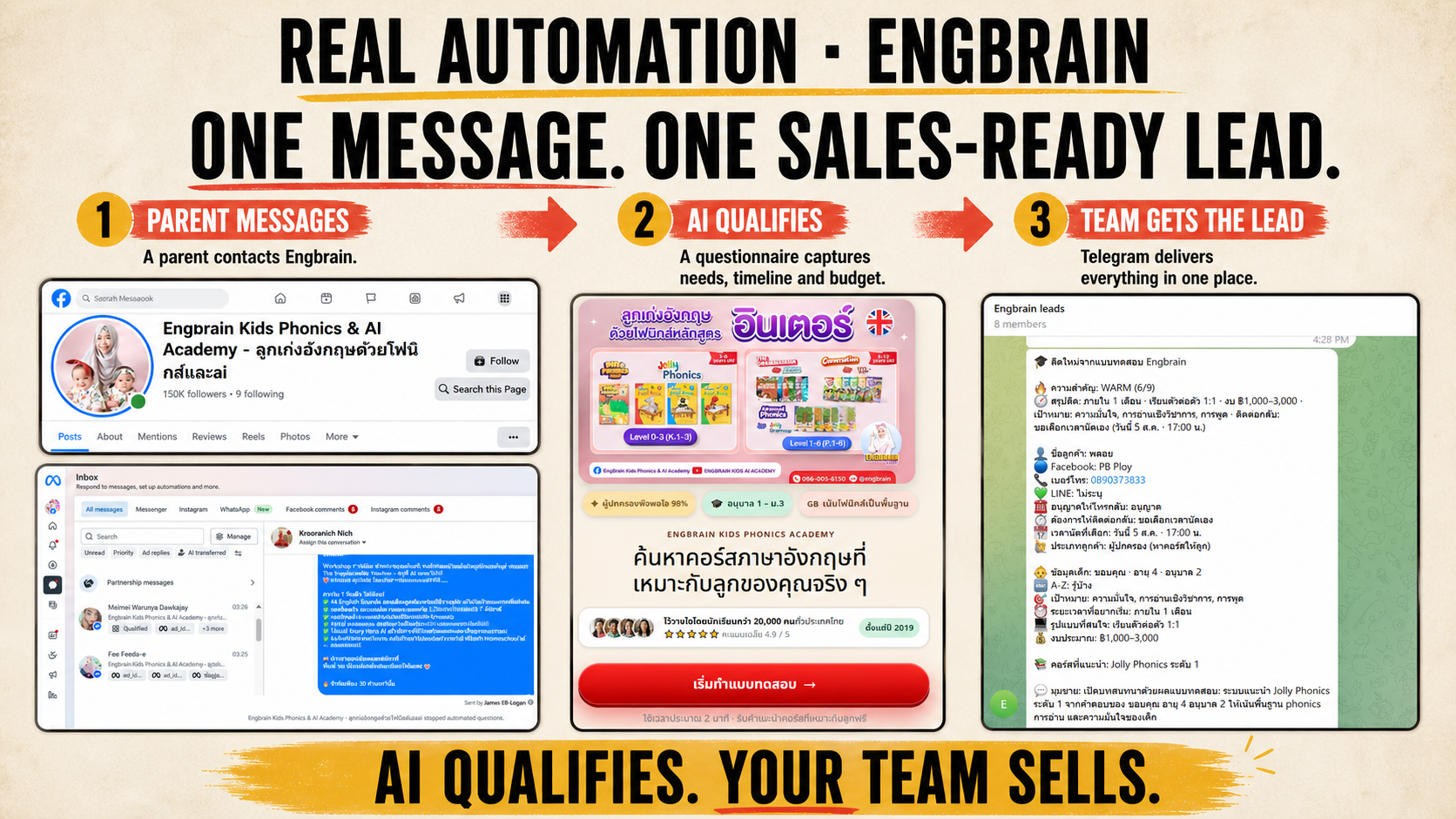
Real Claude use case · from ad to paid seat
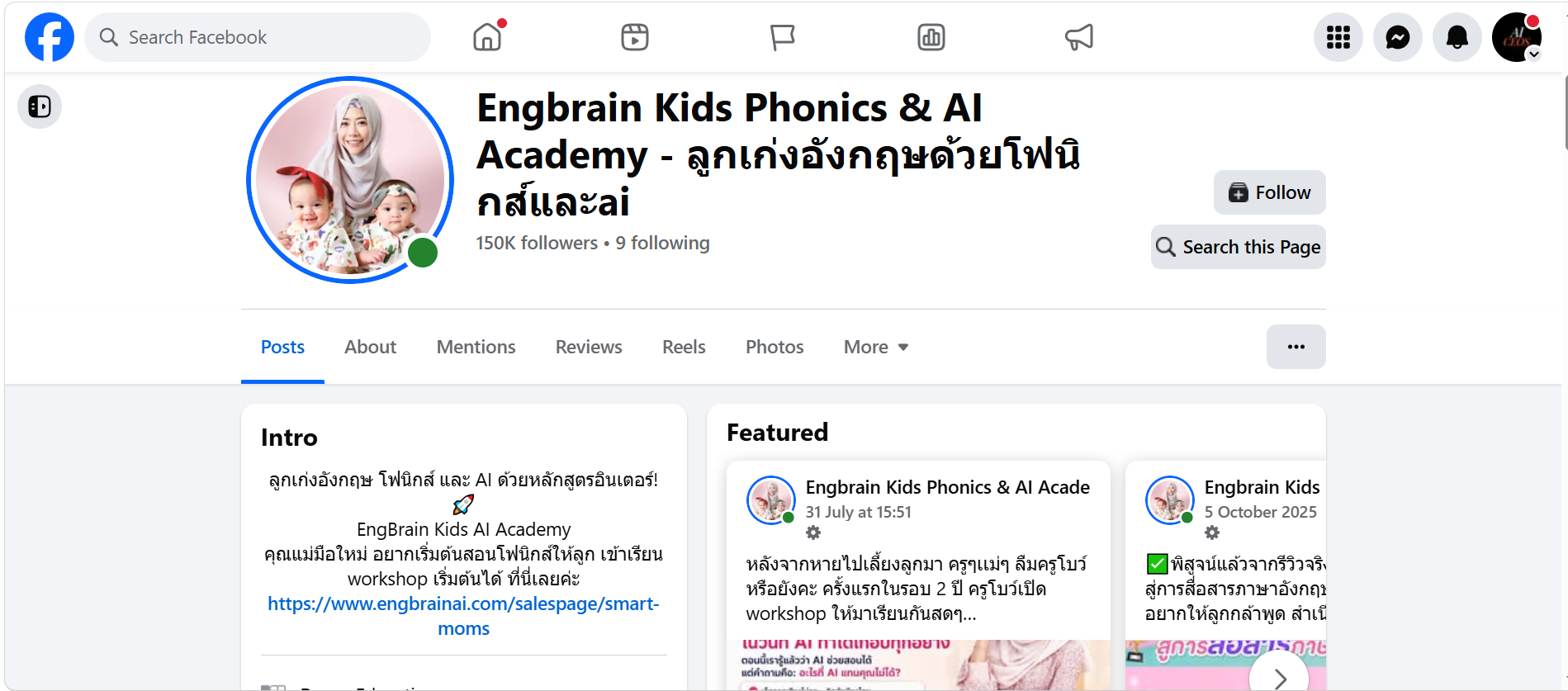
1 Claude makes the ad

Idea, words and design. No designer.
2 Claude builds the page

The page people book on. No developer.
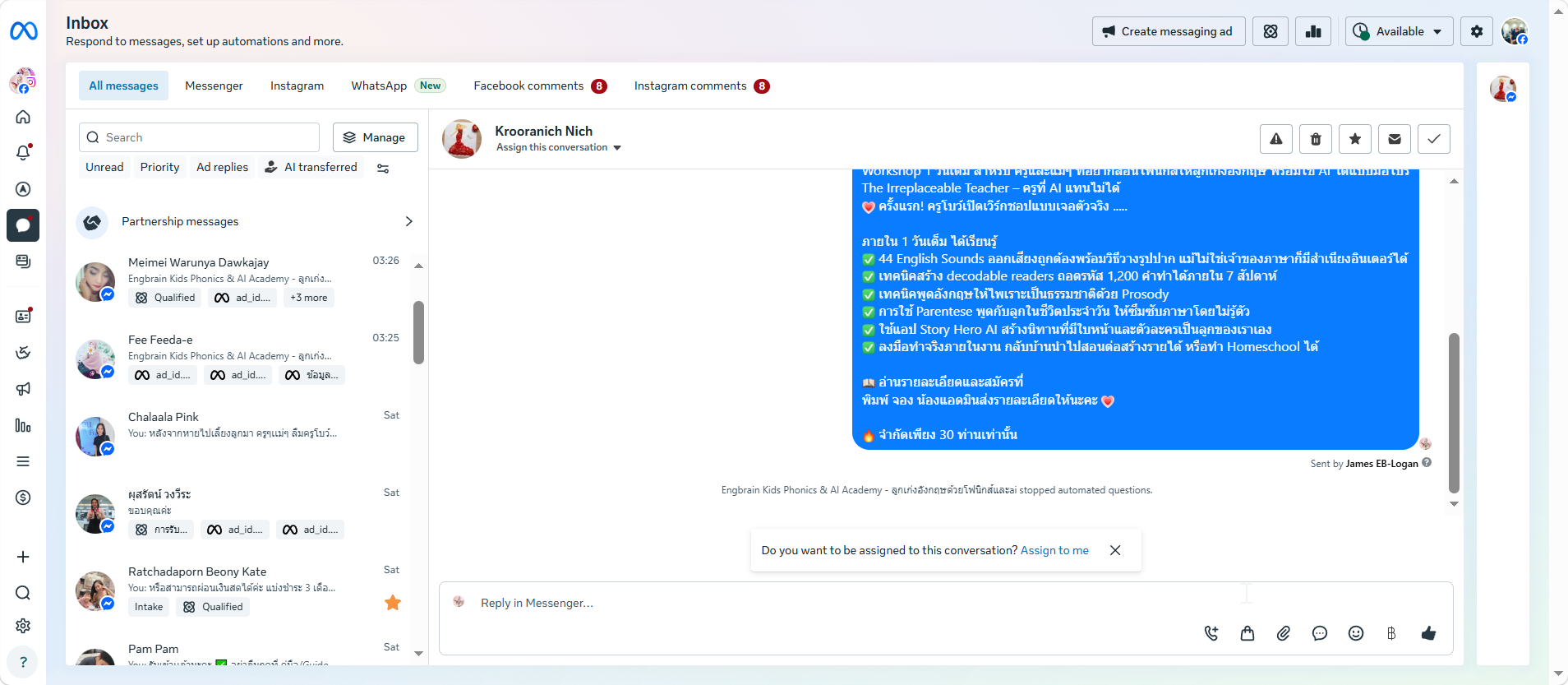
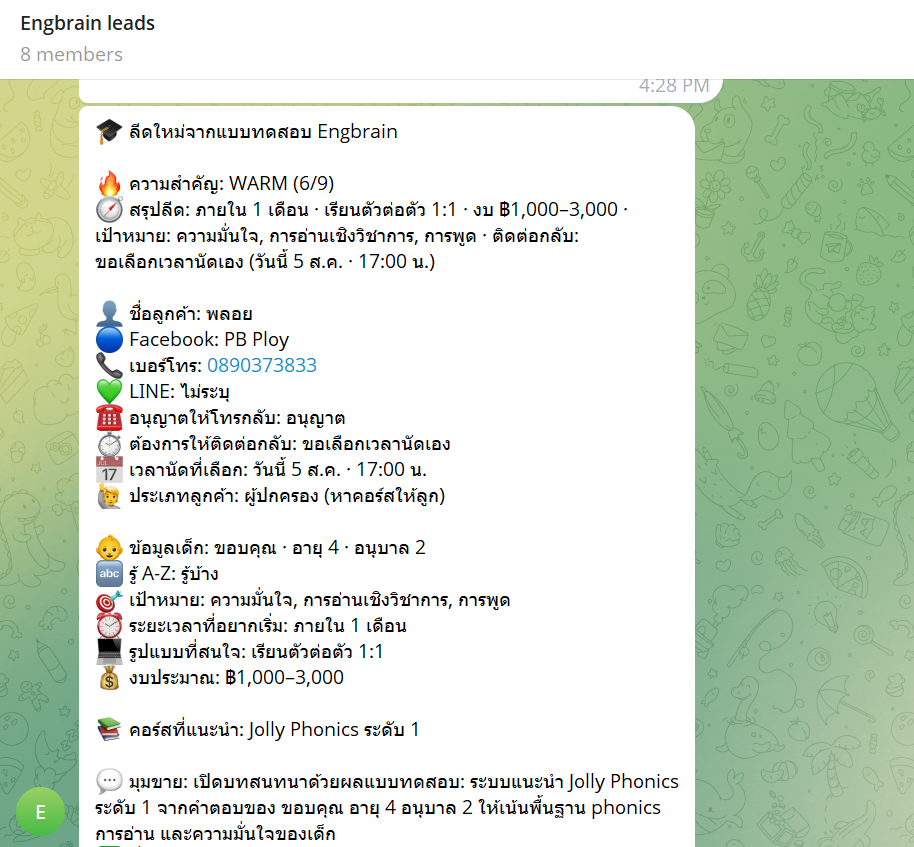
3 Claude answers the leads
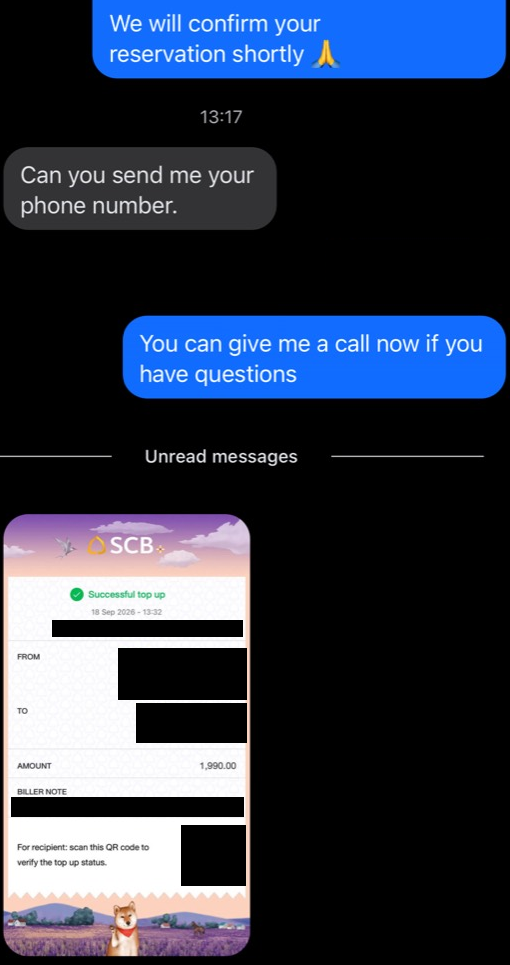
Replies in Messenger and sends payment details.
4 The customer pays
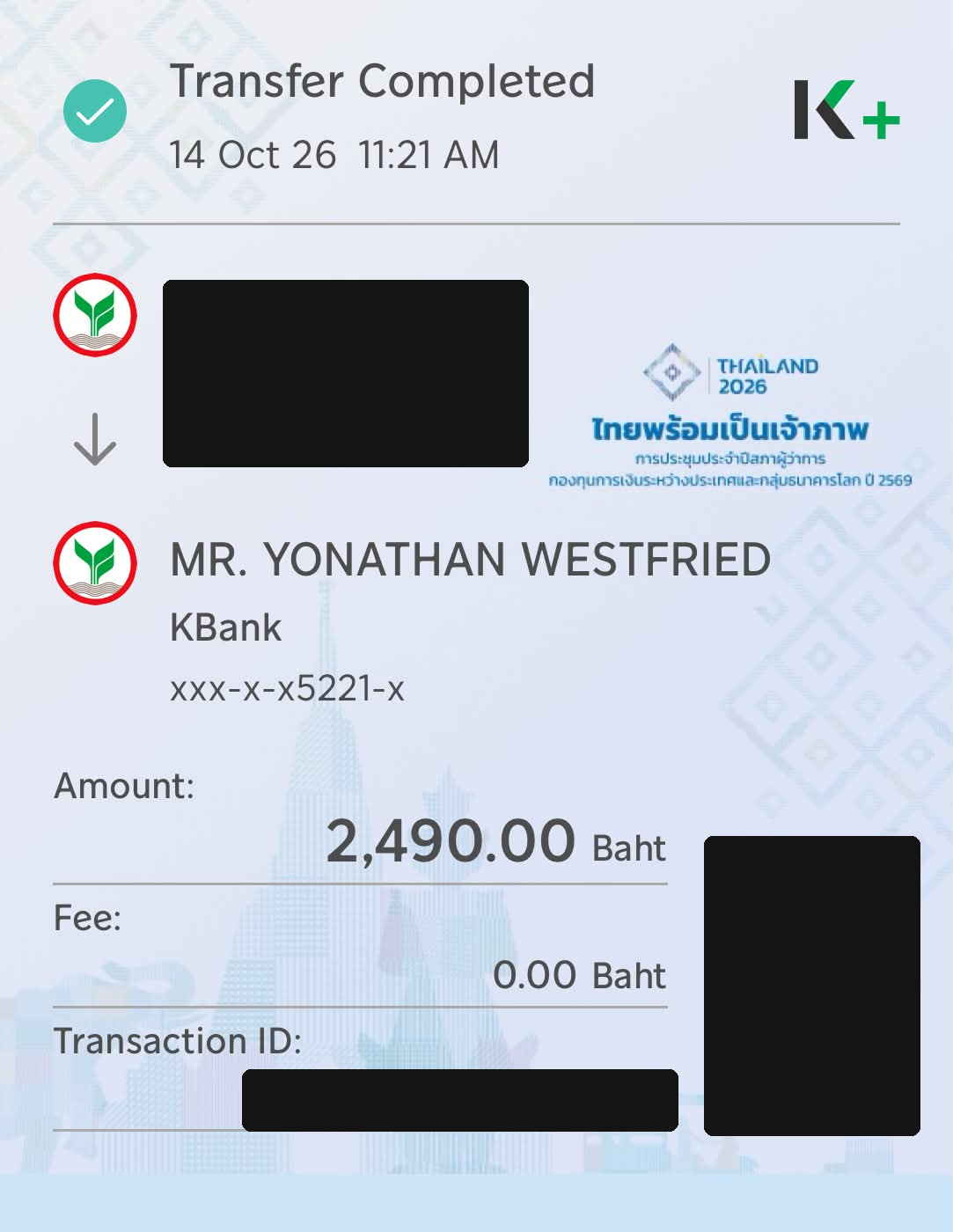 ✓ ฿2,490 received
Payment in, seat booked.

0
paid seats
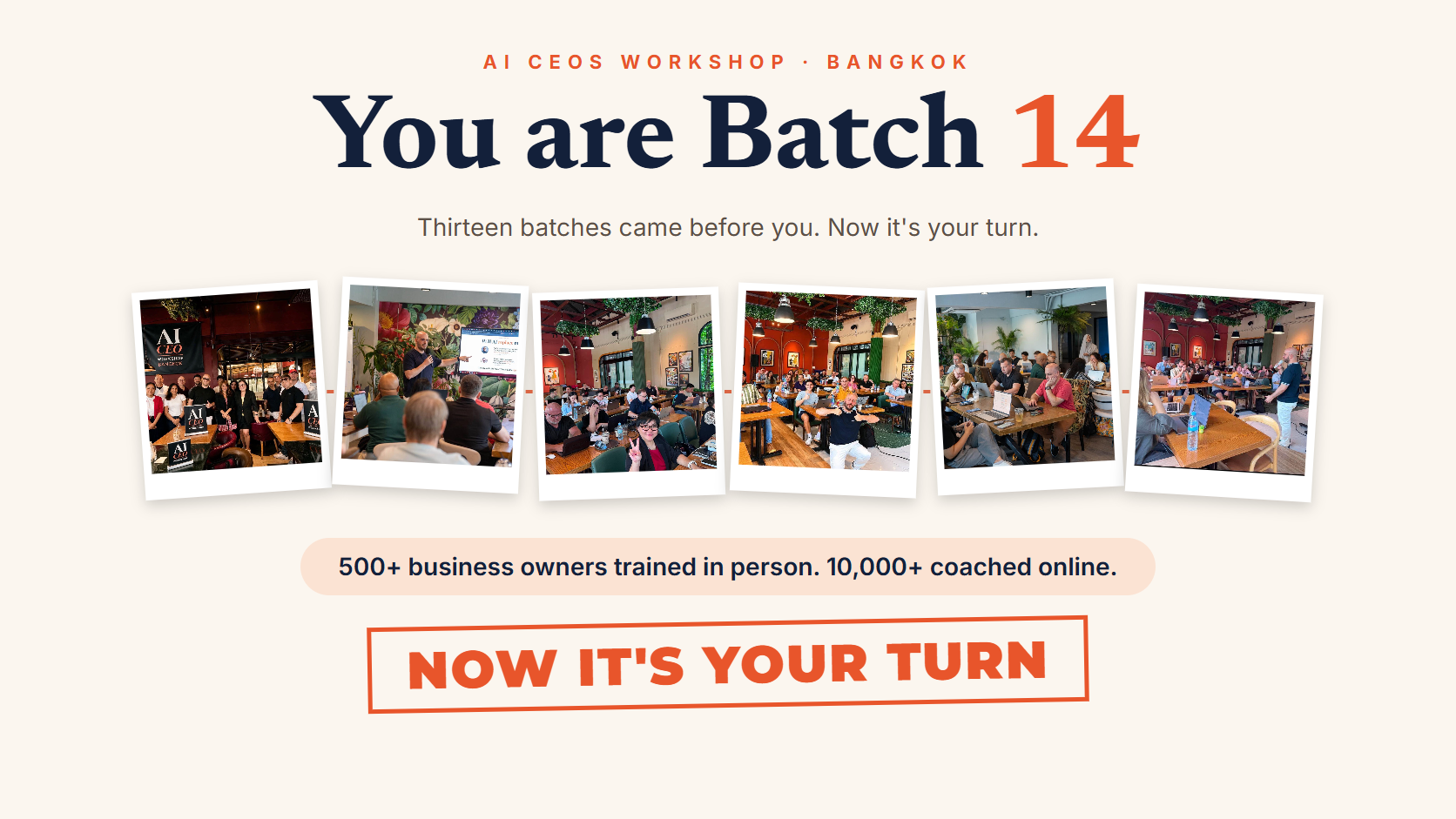
Real customers. Real room.
Real screens from our workshop funnel: ad, page and chat from the Sep 19 workshop, payment from a buyer on 14 Oct. Private details hidden. Room photo from a previous workshop.
Every step before the sales conversation happens automatically.

Pair up

5-minute build sprint
Work with your partner. Keep it simple enough to explain in one sentence.
Before time runs out
Be ready to share your answer.
Ready when you are
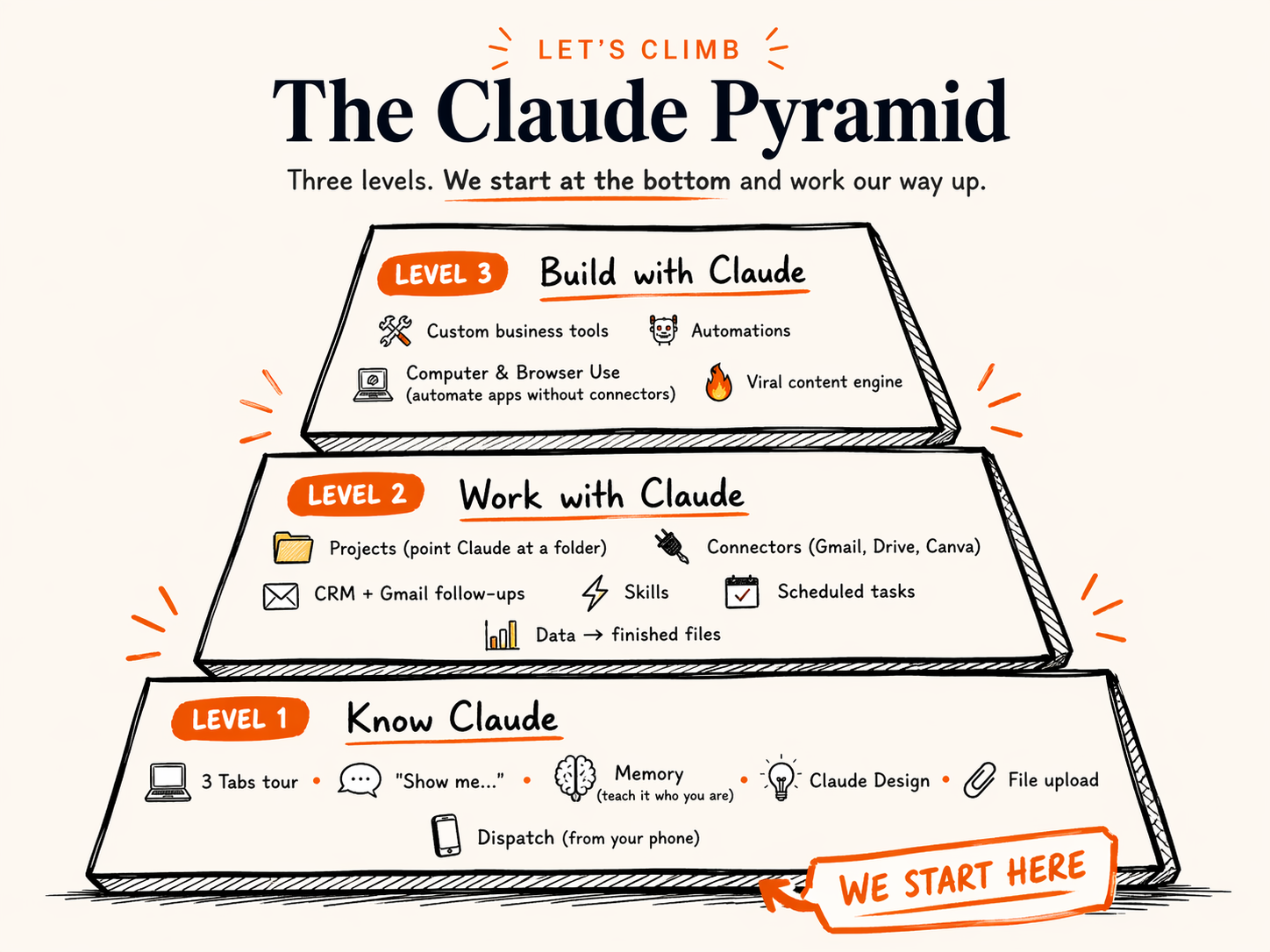
How you work with Claude

Cowork
Do this for me
Ask, think it through, then hand over the whole task.
Answers · drafts · files · research · apps · recurring work

Claude Code
Build this for me
Create working systems that keep running.
Websites · tools · integrations · automation
Cowork = delegation | Code = construction
First exercise · Step 1 of 2
New
Projects
Artifacts
Scheduled
Design
Customize
More
Pinned
Recents
YYour name · Pro
What shall we think through?
Projects
New projectProjects
New projectCreate a project
What are you working on?
What are you trying to achieve?
Context optional
Add contextProjects / My Bakery Business
My Bakery Business
Add folder
Sonnet 5.5 Medium Manual
Claude references the same knowledge every time you talk to it in this project.
InstructionsAdd
ContextAdd
MemoryView
ScheduledAdd
Private
Projects / My Bakery Business
My Bakery Business
Add folder
Sonnet 5.5 Medium Manual
Claude references the same knowledge every time you talk to it in this project.
InstructionsAdd
ContextAdd
MemoryView
ScheduledAdd
Private
Set project instructions
Provide Claude with relevant instructions and information for sessions within My Bakery Business. This will work alongside your profile instructions and the selected style in a session.
Projects / My Bakery Business
My Bakery Business
Add folder
Sonnet 5.5 Medium Manual
Claude references the same knowledge every time you talk to it in this project.
InstructionsAdd
ContextAdd
MemoryView
ScheduledAdd
Private
First exercise · Step 2 of 2
New
Projects
Artifacts
Scheduled
Design
Customize
More
Pinned
Recents
YYour name · Pro
Projects / My Bakery Business
My Bakery Business
Add folder
Sonnet 5.5 Medium Manual
Claude references the same knowledge every time you talk to it in this project.
InstructionsAdd
ContextAdd
MemoryView
ScheduledAdd
Private
Projects / My Bakery Business
My Bakery Business
Add folder
Sonnet 5.5 Medium Manual
Claude references the same knowledge every time you talk to it in this project.
InstructionsAdd
ContextAdd
MemoryView
ScheduledAdd
Private
Upload from device
Add text content
Your connected apps
Files
Folder
Projects / My Bakery Business
My Bakery Business
Add folder
Sonnet 5.5 Medium Manual
Claude references the same knowledge every time you talk to it in this project.
InstructionsAdd
ContextAdd
MemoryView
ScheduledAdd
Private
Open
Downloads
Desktop
Documents
invoice-september.pdf
AI-CEO-CONTEXT.md
menu-photo.jpg
price-list.xlsx
Projects / My Bakery Business
My Bakery Business
Add folder
Sonnet 5.5 Medium Manual
Claude references the same knowledge every time you talk to it in this project.
InstructionsAdd
ContextAdd
MemoryView
ScheduledAdd
Private
Projects / My Bakery Business
My Bakery Business
Add folder
Sonnet 5.5 Medium Manual
Claude references the same knowledge every time you talk to it in this project.
InstructionsAdd
ContextAdd
MemoryView
ScheduledAdd
Private
Projects / My Bakery Business / New session
Here is what I understand about your business:
No file? Open ai-ceo-context-builder.ywest.chatgpt.site (6 minutes), or type 5 lines about your business into Instructions.
5 minutes · Your business Project
Follow steps 1-6. Ask the room for help if you get stuck.
Before time runs out
Be ready to read your 3 tasks out loud.
Ready when you are
Before we go further · AI safety
5 habits that keep your business safe.
AI safety · Your questions answered
"But is it safe?"
Easy trick
Add these words to the end:
in an interactive way
Claude builds something you can play with. Not just text.
Profit per month
Total profit over 12 months:
Your turn
Open Claude. Type "Show me..."
End with "in an interactive way". Then make it yours.
📈 "Show me how my profit changes when I raise my prices, in an interactive way"
🎯 "Show me my sales funnel from ad click to paying customer, in an interactive way"
🧾 "Show me where my money goes each month: rent ฿30k, staff ฿80k, ads ฿20k, software ฿5k, in an interactive way"
⏱ "Show me how many hours a week I save if AI does my 3 most repeated tasks, in an interactive way"
💰 "Show me how ฿100,000 grows at 7% a year for 20 years, in an interactive way"
📅 "Show me a 12-week plan to launch my next product, in an interactive way"
Pick one, or write your own. You have 3 minutes. Use a laptop: visuals don't show in the phone app. Only got text? Reply "Make it interactive."
Take a Few Minutes
Keep asking Claude to show you. Try different prompts.
Ask Claude to show you something about YOUR business.
5 minutes · Show me
Use a laptop, not the phone app. Only got text? Reply “Make it interactive.”
Before time runs out
Show your neighbour your best visual.
Ready when you are
Still Level 1
3 More Moves to Know Claude
Quick wins that make every future chat better.
Your turn · Memory
New
Projects
Artifacts
Scheduled
Design
Customize
More
Pinned
Recents
YYour name · Pro
What shall we think through?
you@yourbusiness.com
Settings Ctrl+Shift+,
Usage
Language
Get help
View all plans
Get apps and extensions
Log out
Settings
General
Account
Privacy
Billing
Usage
Capabilities
Memory
Design systems
Reflect
Time and focus
Claude Code
Claude in Chrome
Customize
Skills
Connectors
Appearance
Memory
You
Your turn · Claude Design
What do you want to build? Tap one
5 minutes · Memory + Design
Memory first. Claude Design is a bonus (Pro plan or higher).
Before time runs out
Who got a post that sounds like them?
Ready when you are
Know your controls
New
Projects
Artifacts
Scheduled
Design
Customize
More
Pinned
Recents
YYour name · Pro
What shall we think through?
Hardest jobs. Uses the most.Fable 5.1For your toughest challenges
Complex, many steps.Opus 5.5For complex work and everyday tasks
Start here for everyday work.Sonnet 5.5Most efficient for simpler tasks
Quick, simple answers.Haiku 5.5Fastest for quick answers
EffortMedium
More models
Higher effort means more thorough responses, but takes longer and uses your limits faster.
Low
Medium Recommended
High
Extra
Max 5× or more usage
Permission mode
ManualClaude asks before using new tools or opening new sites.
AutoClaude runs on its own and pauses to ask if anything looks unsafe.
Which Claude for which job?

Sonnet 5.5
The car · everyday
Emails, summaries, documents, slides and spreadsheets.

Opus 5.5
The van · complex work
Analysis, automation, building tools. Jobs with many steps.

Fable 5.1
The crane · biggest jobs
Hard thinking and long projects with many stages.
Not sure? Start with Sonnet 5.5. Too hard for it? Move up to Opus 5.5.
Speed from Anthropic's model guide (fast, moderate, slower). Cost dots follow Anthropic's published prices: about 1x, 2x and 5x. Performance: Fable 5.1 is Anthropic's model for the hardest work, Opus 5.5 matches it on most work, and Sonnet 5.5 comes close to Opus on many tests. Models overview ↗
Effort
Low
Quick replies, fixing a sentence, simple questions.
MediumRecommended
Most work: emails, posts, documents, summaries.
High
Plans, analysis, tricky writing, numbers.
Extra
Big tasks with many steps.
Max5×+ usage
Only the hardest problems. Uses 5× or more.
Permissions
Claude Code
Plan
Makes a plan first. Changes nothing until you say yes.
Use it forBig changes. When you are learning.
Cowork (chat)
Manual
Asks before using new tools or opening new sites.
Use it forNew tasks, your accounts, money, customers.
Claude Code
Accept edits
Edits files without asking. Still checks with you on other things.
Use it forYou trust the plan and want speed.
Cowork + Code
Auto
Runs on its own. Pauses to ask if anything looks unsafe.
Use it forTasks you have done before. Research.
Claude Code
Bypass permissions
Never asks. Does everything.
Use it forExperts only, on a test project. Never with real customer data.
Usage limits
5-hour session
Refills every 5 hours
This week
Refills once a week
What burns fuel fastest
Make it last
Current session 37% used
This week 35% used
Block 1 · Cowork
What is Cowork?
A teammate that opens your files, does the work, and hands it back finished.
Excel, PowerPoint, PDF, images - it opens them, edits them, and gives them back.
Claude shows its progress and asks before sensitive actions.
Describe the job, walk away, come back to finished work.
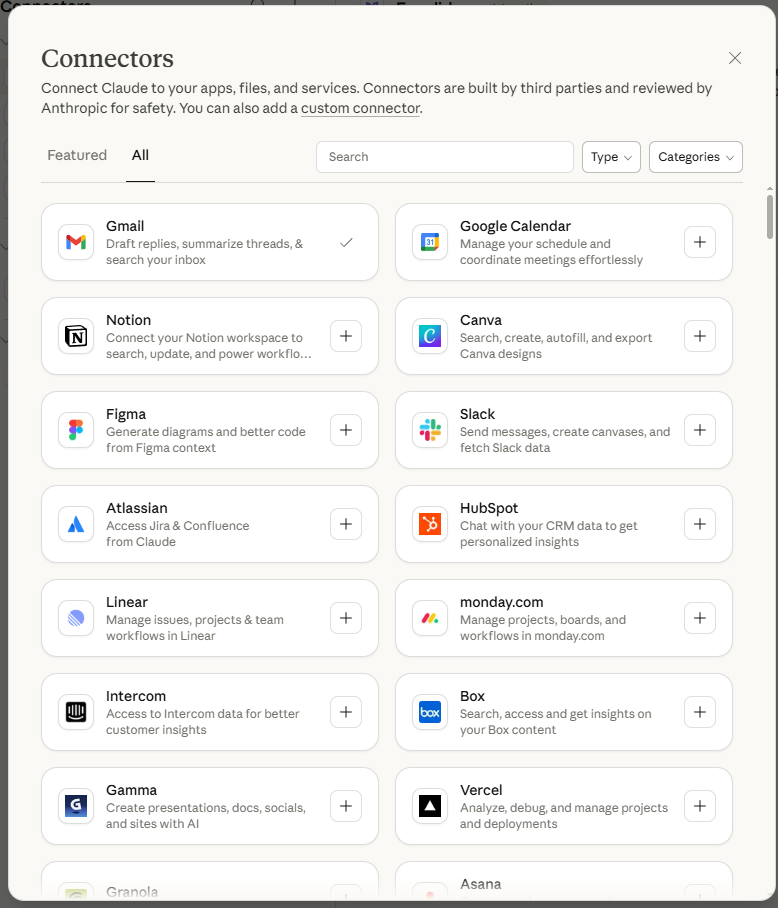
Connect Claude to your real tools
Connectors let Cowork read, write, and act inside the apps you already use.
How Connectors Work
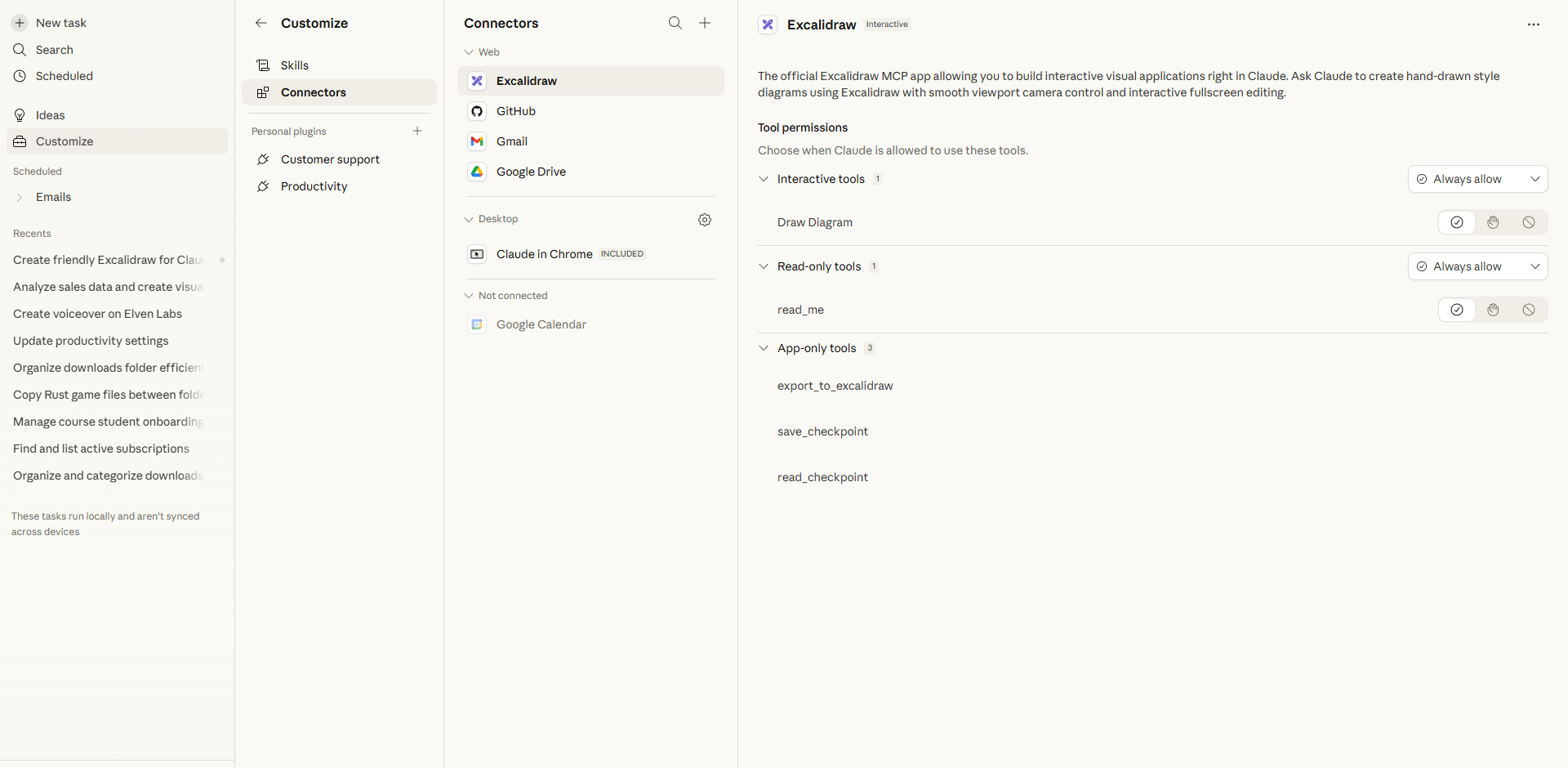
Connect an app once. Then choose it when Claude needs it.
1. Set up connectors in Customize
2. Claude uses them in your tasks
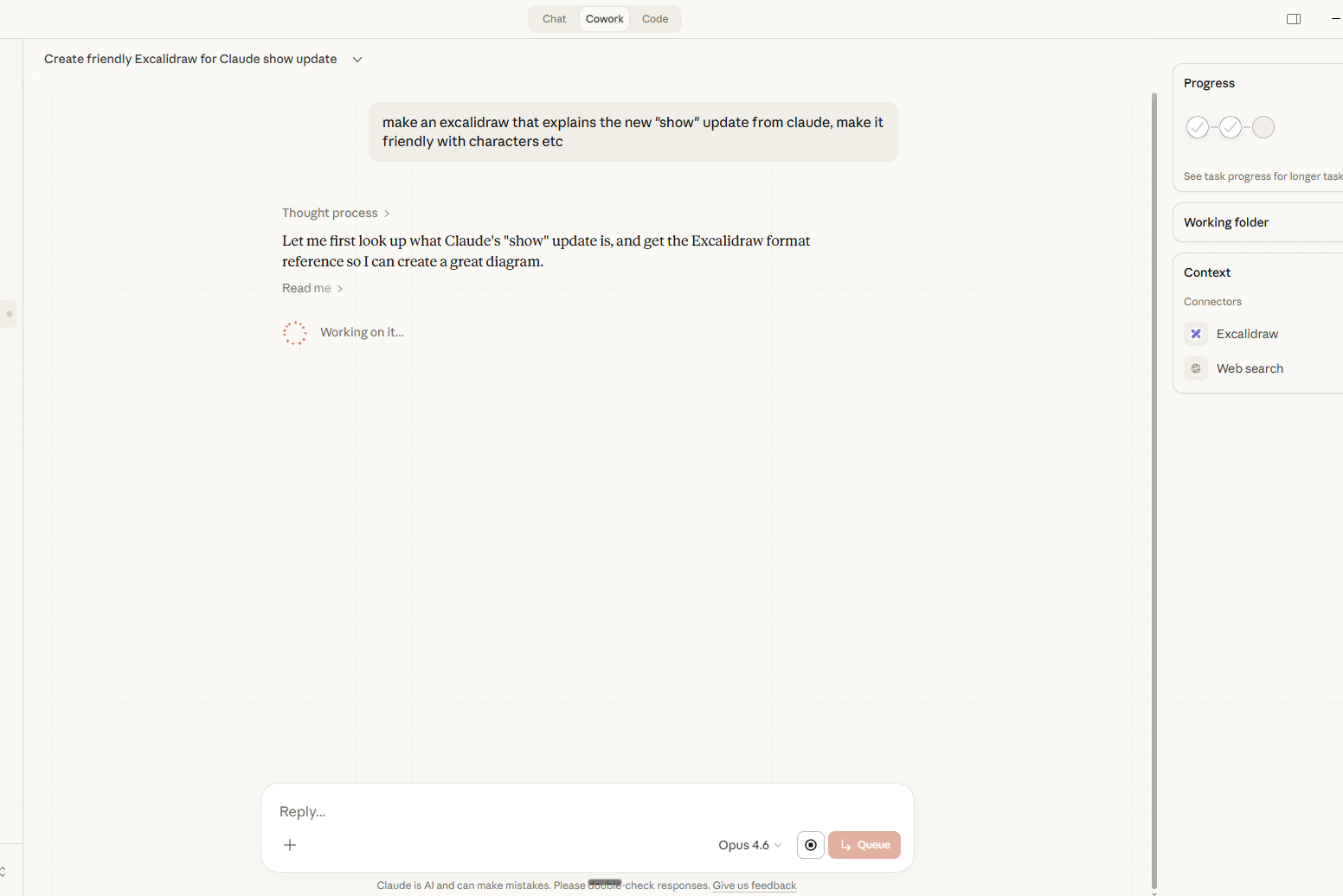
Example: “Summarize my important emails.” Claude uses Gmail and gives you a clean summary with draft replies.
Let's Try Together
📧 Try the Gmail Connector
Cowork → Customize → Connectors → find Gmail → click + → sign in to Google
Click New task in the sidebar. Check that Gmail shows in your connectors.
Paste this prompt
Summarize my important emails from the last 48 hours. Group them by sender, flag anything that needs a reply today, and tell me what I can safely ignore. Then draft quick replies for the top 3.
About 30 seconds - your whole inbox sorted, with replies ready to send.
Let's Try Together
🎨 Try the Canva Connector
Cowork → Customize → Connectors → find Canva → click + → log in to Canva
Click New task. Check that Canva shows in your connectors.
Paste this prompt
Create a professional Instagram post for my business [your business name]. Use Canva to design it. The post should announce [a promotion, event, or new product]. Use modern, clean design with bold text.
Claude designs it straight into Canva - open your account and keep editing.
Let it finish.
Wait for your Gmail or Canva result to land - then show your neighbour what you made.
Done early? Add one more connector and try it. · Hand up if you need help.
5 minutes · Connectors
Gmail or Canva. Sign in, start a new task, paste the prompt.
Before time runs out
Show your neighbour what Claude did.
Ready when you are
Cowork power moves
Not answers. Finished files you can open, use and send.
I demo each one. Then you try.
Use case 1 · Sales
Every lead on a card. Drag it when the deal moves. No Salesforce. No HubSpot.
Paste this into Claude
What you get
New lead 4
฿805,000
Contacted 3
฿235,000
Proposal 3
฿1,330,000฿480,000
Negotiating 2
฿270,000
Won 2
฿63,000฿913,000
Lost 1
฿55,000
Your turn · Use case 1
Paste this
It takes 1 to 2 minutes. Watch the next demo while it builds.
Use case 2 · Numbers
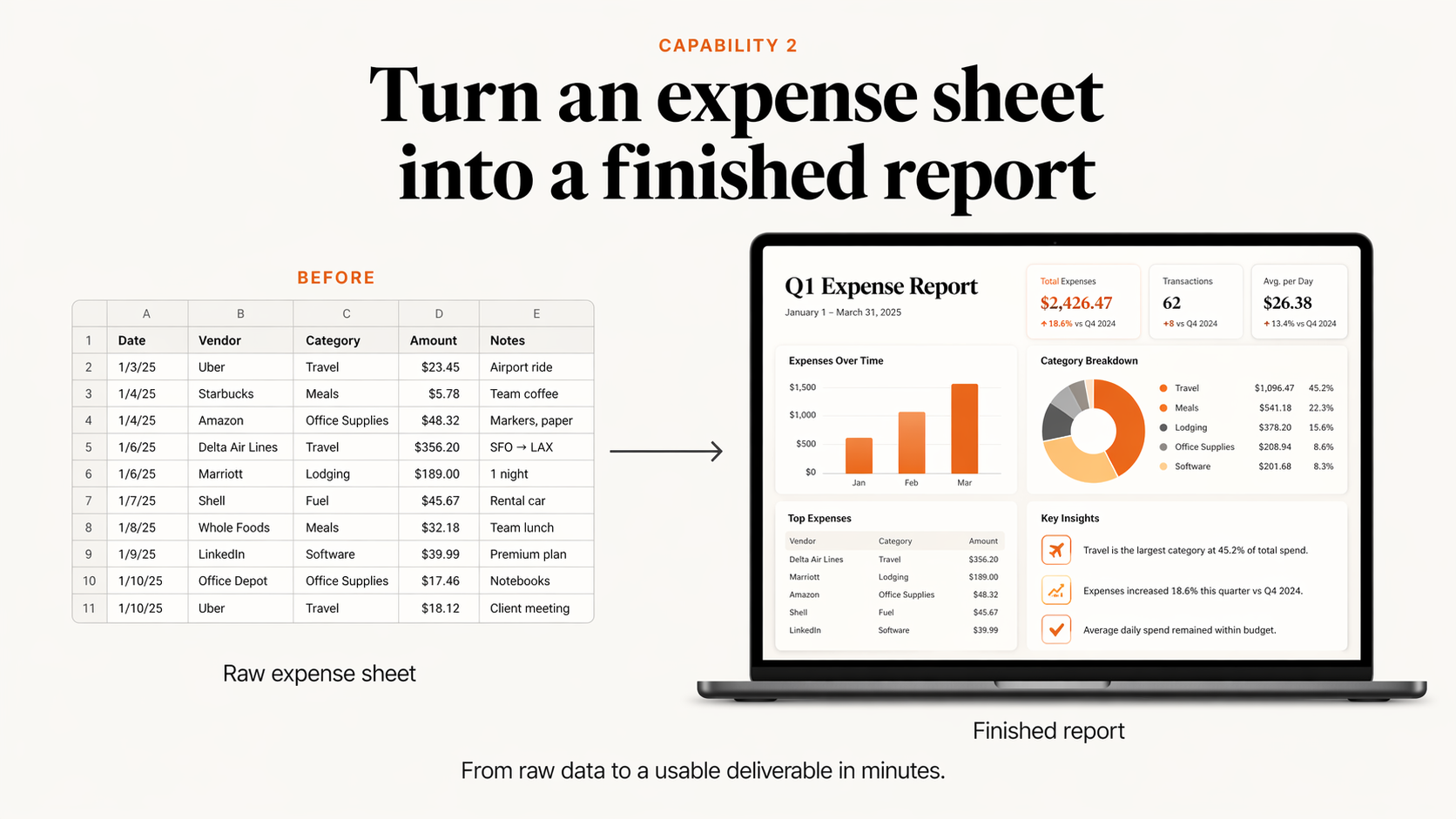
Charts, totals and who still owes you. Plus 3 tips to grow.
Paste this into Claude
What you get
Sales by month +33%
Sales by type
3 ways to grow
March was your best month. Run the March promo again.
Services bring 39% of sales. Sell more monthly plans.
6 customers owe ฿109,000. Send reminders this week.
Your turn · Use case 2
Paste this
While it runs, check your sales board.
Use case 3 · Admin
Claude reads every invoice for you. You see the total, and who to chase.
Paste this into Claude
What you get
Use case 4 · Marketing
Menu, prices, reviews and a booking button. It works on a phone too.
Paste this into Claude
What you get
Sukhumvit Soi 22 · Open 7am to 9pm
★★★★★ "Best mango sticky rice in Bangkok."
★★★★★ "So friendly. We come every week."
Use case 5 · Sales
Three clear options. Most customers pick the middle one.
Paste this into Claude
What you get
Price quote
New logo and menu design
Basic
฿15,000Standard
฿28,000Premium
฿45,000Use case 6 · Customers
What customers love, what to fix first, and a reply for every bad review.
Paste this into Claude
What you get
30 reviews read
"Best mango sticky rice in Bangkok!"
Love"Waited 25 minutes at lunch."
Fix"Staff are so friendly."
Love"Wi-Fi kept dropping."
Fix+ 26 more
Customers love
Fix first
Use case 7 · Team
Tell Claude who can work when. It solves the puzzle and makes the Excel file.
Paste this into Claude
What you get
Staff schedule · next week Open 8am to 8pm
Use case 8 · Admin
Claude opens each file, works out what it is, renames it and sorts it.
Paste this into Claude
What you get
Before · Downloads
After · sorted and renamed
Receipts
Contracts
Tax
Marketing
Your turn · Pick one
Change the words in [brackets] to your business.
Website5 min
Price quote2 min
Review report2 min
New chat in Claude. Paste. Press Enter.
Take a few minutes
Download each result and open it. Then ask Claude for one change.
Who wants to show the room?
5 minutes · Cowork builds
Sales board, dashboard, website or quote. Download it and open it.
Before time runs out
Who wants to show their screen?
Ready when you are
🍴
Lunch Break
Enjoy your meal. We'll start again at 1:00.
Feel free to keep playing with Claude while you eat.
🙋
Quick Q&A
Questions about anything so far?
Content Creation
Create Viral Content
with Proven Frameworks
Most people ask AI to "write a post" and get generic garbage.
We're going to give it a proven framework and get gold.
Why Most AI Content Fails
Your Secret Weapon
12 Viral Script Frameworks
Download this PDF. Upload it to Claude. Ask it to pick the right framework for your business and write you a script.
Save this. You'll use it every time you create content.
Let's Try Together
🎬 Create Your Viral Script
Step 1: Upload the PDF
Open Cowork. Attach the Scripting Frameworks PDF you just downloaded.
Claude will analyze all 12 frameworks and pick the best one for YOUR business.
Take a Few Minutes
Wait for your script. Read it. Ask Claude to tweak the tone or make another version.
Try: "Make it more casual" or "Write a second version using the PAS framework"
5 minutes · Viral scripts
Ask Claude to tweak the tone, or write a second version with another framework.
Before time runs out
Be ready to read your hook out loud.
Ready when you are
🙋
Open Q&A
Ask me anything about what we covered today.
The Big Picture
What You Built Today
Interactive visuals from a simple prompt
Real files, charts, websites, newsletters
Gmail, Canva, Notion, Drive and more
Viral scripts from proven frameworks
One Claude subscription. No developer needed.
Take this home
What to do on Monday.
One task. Every week. That's how the time savings add up.
Thank you.
Now go build something that makes money.
Jonny West · KruBow